Reading the repo
- Difficulty
- Easy
- Time
- about 5 min
- Stars
- ★ 15
- Activity
- Updated 1 months ago
- License
- GPL-3.0
- Open issues
- 1
- Got it running
- Be the first
- Looked up
- just now
Fresh setup, read just now
Start here
Will it work on my device?
Yes, it runs on Linux
- You'll build it yourself with Python.
4 steps on Linux
Then run bash setup.sh. It stops at the first error and is safe to run again. Servers and tests aren't started; it lists them at the end. Read it first.
Clone the repository
The repo uses git submodules, so the clone fetches them too.
git clone --recurse-submodules https://github.com/OpenMinimed/PythonPumpConnector.git
cd PythonPumpConnector
Install the required runtimes
Python 3.x (no version pinned)
sudo apt install python3 python3-venv # Debian/Ubuntu
Install dependencies
python -m venv .venv
source .venv/bin/activate
pip install -r requirements.txt
Run it
python main.py
From the README: How to use
The pump communicates over Bluetooth Low Energy (BLE), so you need a computer with support for that.
Pairing
Pump and computer must be paired once. Once paired, reconnects do not require pairing again.
Open two terminals. In the first:
bluetoothctl --agent=NoInputNoOutput
NoInputNoOutput is essential — the pump requests the MITM flag but does not support LE Secure Connections, so the kernel falls back to Just Works pairing. Without this agent, pairing is rejected.
If your pump still shows another connected mobile device, remove it first (the pump only connects to one "phone" at a time).
On the pump, start searching for new devices. In the second terminal, run:
./main.py
The script advertises as Mobile XXXXXX (random number). After a few seconds, the pump should find it and prompt you to connect. Accept the pairing request in the bluetoothctl terminal when prompted.
Alternatively, you can provide a custom name instead of the random number (max. 7 characters):
./main.py <name>
[!NOTE] The script may prompt for
sudoto set up BLE advertising.
After GATT discovery and the SAKE handshake, the script presents an interactive menu of commands for reading pump data (CGM, features, event history, etc.).
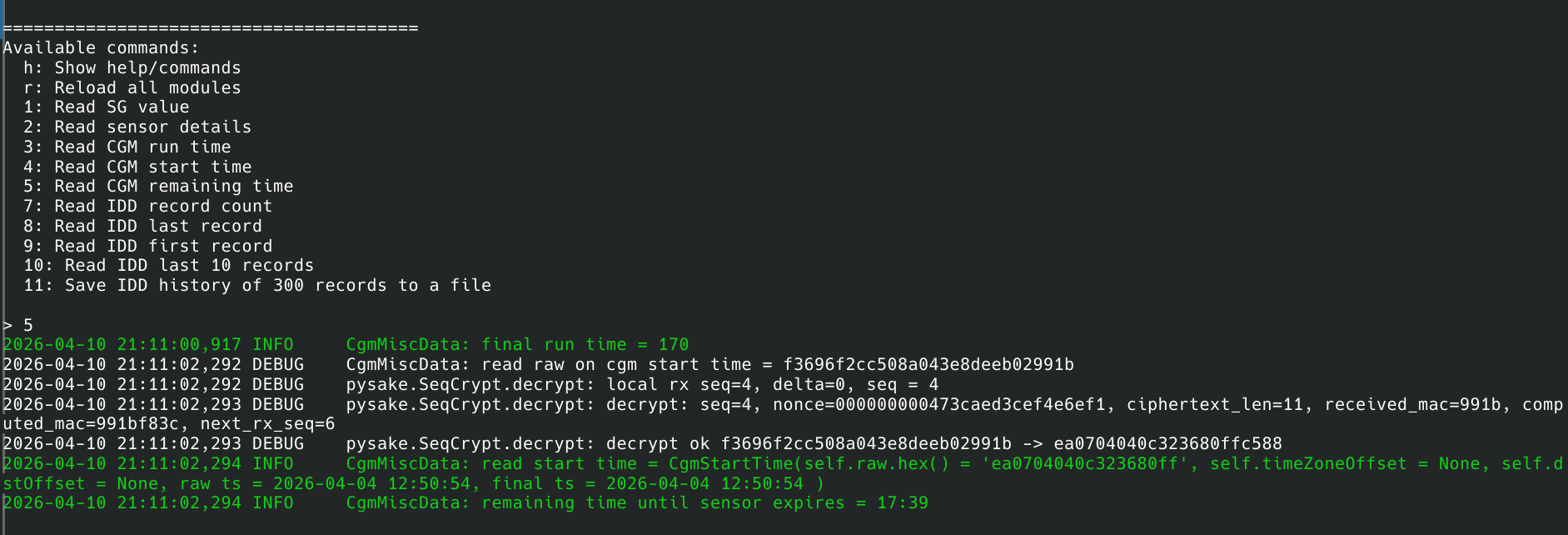
[!NOTE] One special command syncs the pump's event history with a local SQLite database. This is useful for preserving the full history offline, because we can currently only access the last 4–5 days worth of history data.
Reconnects
If the script was stopped after a successful SAKE handshake, reconnect without re-pairing:
./main.py --reconnect
The name used during pairing need not be supplied here again. The second terminal with bluetoothctl is not needed either.
Database viewer
After syncing history data, explore the local SQLite database:
python3 -m database.viewer
This parses all stored records, prints them, lists event types, detects sequence-number gaps, and generates a daily datapoint-count graph (history_graph.png).
[!NOTE] The viewer does not require a connection to the pump. It works solely on the local database file.
Did you get it running?
No reports for Linux yet.
Still stuck? Ask an AI
Opens a chat with this manual already filled in, for Linux. It uses your own account; gitmanual sends nothing.