Reading the repo
Opening the box…
Reading the repo
Opening the box…
How to install on Windows
AI-powered penetration-testing pipeline. Specialised agents recon, exploit and adversarially verify web-application vulnerabilities, then produce evidence-backed reports and per-finding fix branches. White-box (source) and grey-box (no-source) modes. Built by CERT-EU.
Saved setup from 2 h ago
Will it work on Windows?
make (e.g. winget install GnuWin32.Make) or WSL.Heads-upIt also needs PostgreSQL.
Then run powershell -ExecutionPolicy Bypass -File .\setup.ps1. It stops at the first error and is safe to run again. Servers and tests aren't started; it lists them at the end. Read it first.
Needs Git: winget install Git.Git
git clone https://github.com/certeu/vigilo.git
cd vigilo
Python >=3.11, Docker
winget install astral-sh.uv
winget install Docker.DockerDesktop
Needs: PostgreSQL
winget install Docker.DockerDesktop
docker compose -f docker-compose.yml up -d
uv sync
uv run pytest
Makefile targets need make (e.g. winget install GnuWin32.Make) or WSL.
docker compose).git clone <your-fork-url> vigilo && cd vigilo
cp env.sample .env
Edit .env and set, at minimum:
# Public hostname — Traefik serves the UI here over HTTPS
VIGILO_HOSTNAME=vigilo.example.com

# Platform secrets (required)
VIGILO_JWT_SECRET=<a long random string>       # signs login tokens (>= 32 bytes)
VIGILO_FERNET_KEY=<generated key>              # encrypts stored per-user credentials
POSTGRES_PASSWORD=<a strong password>

# First admin, created on first boot (leave blank to skip auto-creation)
VIGILO_FIRST_ADMIN_EMAIL=admin@example.com
VIGILO_FIRST_ADMIN_PASSWORD=<change me>

# One model backend so scans can run (example: Anthropic)
ANTHROPIC_API_KEY=sk-ant-...

# Contact address for the certificate authority. Must be real — Let's Encrypt
# rejects @example.com. Certificates come from Let's Encrypt unless you set
# ACME_CASERVER to a different ACME server.
ACME_EMAIL=you@your-domain.example
VIGILO_HOSTNAME must resolve to this host in DNS, and the certificate authority must be
able to reach it on port 80 to complete the ACME HTTP-01 challenge.
No public hostname? Certificates from an internal CA? Already running your own reverse proxy? Traefik is optional — see Deployment options.
Generate the Fernet key (no dependencies required):
python3 -c "import base64,os;print(base64.urlsafe_b64encode(os.urandom(32)).decode())"
env.sample documents every backend (Anthropic / Bedrock / Foundry / Codex / OpenCode),
corporate-proxy settings, GitLab integration, grey-box knobs, and SMTP.
docker compose --env-file .env -f deploy/docker-compose.full.yml up --build -d
This builds and starts Traefik, Postgres, MailHog, Temporal, the API, the UI, and the worker.
Traefik requests a TLS certificate on first boot and serves the UI at
https://$VIGILO_HOSTNAME (HTTP is redirected to HTTPS). Only ports 80/443 are published;
everything else is internal.
No hostname or certificate yet? Run the same stack over plain HTTP instead — add
-f deploy/docker-compose.plain.ymlto the command above and openhttp://localhost:8080. See Deployment options.
Working on Vigilo itself? You don't need this stack at all — run the API and UI directly with the fake engine, which needs no Docker or Temporal. See Development.
No manual step needed. The API runs Alembic (alembic upgrade head) automatically on boot
(VIGILO_RUN_MIGRATIONS_ON_START=true, the default), so a fresh or existing database is brought
up to the current schema. To run migrations manually (e.g. in CI):
docker compose -f deploy/docker-compose.full.yml exec api python -m scripts.run_migrations upgrade
https://$VIGILO_HOSTNAME and sign in as the first admin..zip/.tar.gz or folder, or connect a GitLab repo).To stop everything: docker compose -f deploy/docker-compose.full.yml down (add -v to also
wipe the Postgres/Temporal/job volumes).
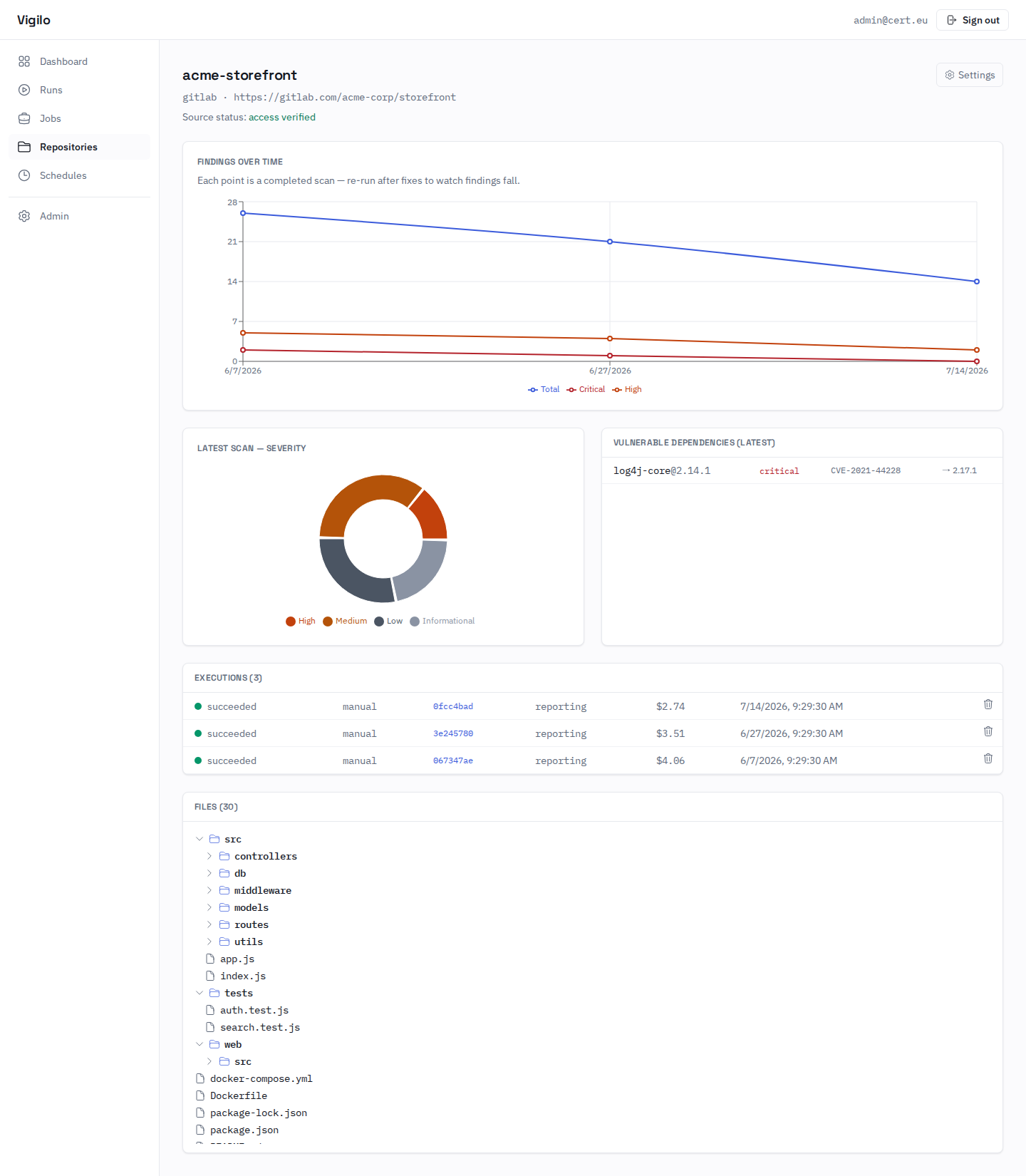
A repository's detail page: findings-over-time as you re-scan, the latest severity breakdown, vulnerable dependencies, past executions, and a browse-only file explorer.
No reports for Windows yet.
GitManual AI Agent reads the 5 key files and writes a step-by-step guide for Windows. Once written, it's saved for everyone.