Reading the repo
Opening the box…
Reading the repo
Opening the box…
How to install on macOS
Build your own AI office with Univer Office SDK. Bring editing, calculation, collaboration, and file processing into your product for people and AI agents. Built on an extensible open-source core.
Saved setup from 8 h ago
Will it work on macOS?
Also: Docs ↗
CONTRIBUTING.mdWelcome, and thank you for your interest in contributing to Univer!
Please read our Code of Conduct before you join in the Univer community.
If you encounter any issues while using Univer, you can seek help in the following communities:
If you encounter any issues or have any suggestions while using Univer, please feel free to raise them in the Github Issues. We will respond promptly.
To better assist you, we recommend:
If you're new to submitting issues, we recommend to read How To Ask Questions The Smart Way and How to Report Bugs Effectively before posting. Well-written bug reports help us and help you!
The development of Univer requires Node.js >= 22.18 and pnpm >= 11. Please make sure you have the correct versions installed.
git clone https://github.com/dream-num/univer
cd univer

# install package manager pnpm
npm i -g pnpm

# install dependencies
pnpm install
pnpm dev
Please refer to Architecture, and also ISOMORPHIC.md for more guidance on how to set up plugins.
For public API compatibility expectations, experimental APIs, internal APIs, and deprecation rules, read API_STABILITY.md.
The structure of the repository is as follows:
.
├── common/ shared configuration, mock data, Storybook, and utilities
├── docs/ documentation
├── examples/ all-in-one Vite workbench for browser development
├── packages/ Univer core and plugins
├── presets/ curated plugin collections
└── tests/ additional integration test projects
The file structure of a plugin should be organized as follows:
|- common/
|- models/
|- services/
|- commands/
  |- commands/
  |- mutations/
  |- operations/
|- controllers/
|- views/
  |- components/
  |- parts/
|- plugin.ts
|- index.ts
There are some limits on what paths could a file import from.
During the refactoring process, it is recommended to remove legacy folders such as Enum, Interface, Basics, and Shared.
Avoid creating barrel imports (index.ts) unless it is the main root index.ts file of a plugin.
We added experimental support for mobile platforms since June 2024. After that, all UI plugins should split ui related code by their running platforms:
|- controllers/
  |- render-controllers/
    |- common/
    |- desktop/
    |- mobile/
|- views/
  |- components/
    |- common/
    |- desktop/
    |- mobile/
  |- parts/
    |- common/
    |- desktop/
    |- mobile/
To effectively contribute as a member of a software engineering team (and community as well!), it is crucial to establish strong contextual connections. Providing links to relevant resources can greatly assist others in understanding the context. Consider the following practices:
By adopting these practices, you can enhance collaboration and facilitate a better understanding of the codebase within our community.
Please refer to Univer Naming Convention.
Before merging a pull request, please make sure the following requirements are met:
We provide preview deployments for pull requests. You can view the preview deployment by clicking the "Preview" link in the "View Deployment" section.
We use Storybook to develop and test components in isolation. It is a great tool to develop UI components in isolation, which can improve component reuse, testability, and development efficiency. You can use the following command to start Storybook:
pnpm storybook:dev
When a new pull request is submitted, a Storybook deployment will be automatically generated. You can view the Storybook deployment by clicking the "Preview" link in the "View Storybook" section.
We provided some Visual Studio Code (vscode) tasks to help you debug in vscode.
After stating dev server, you can launch Edge or Chrome instance and debug in vscode, and you can debug directly in vscode!
To ensure the quality of the code and move with confidence, we require that all code must be covered by unit tests. We use vitest as the unit test framework. You can use the following command to run unit tests:
pnpm test
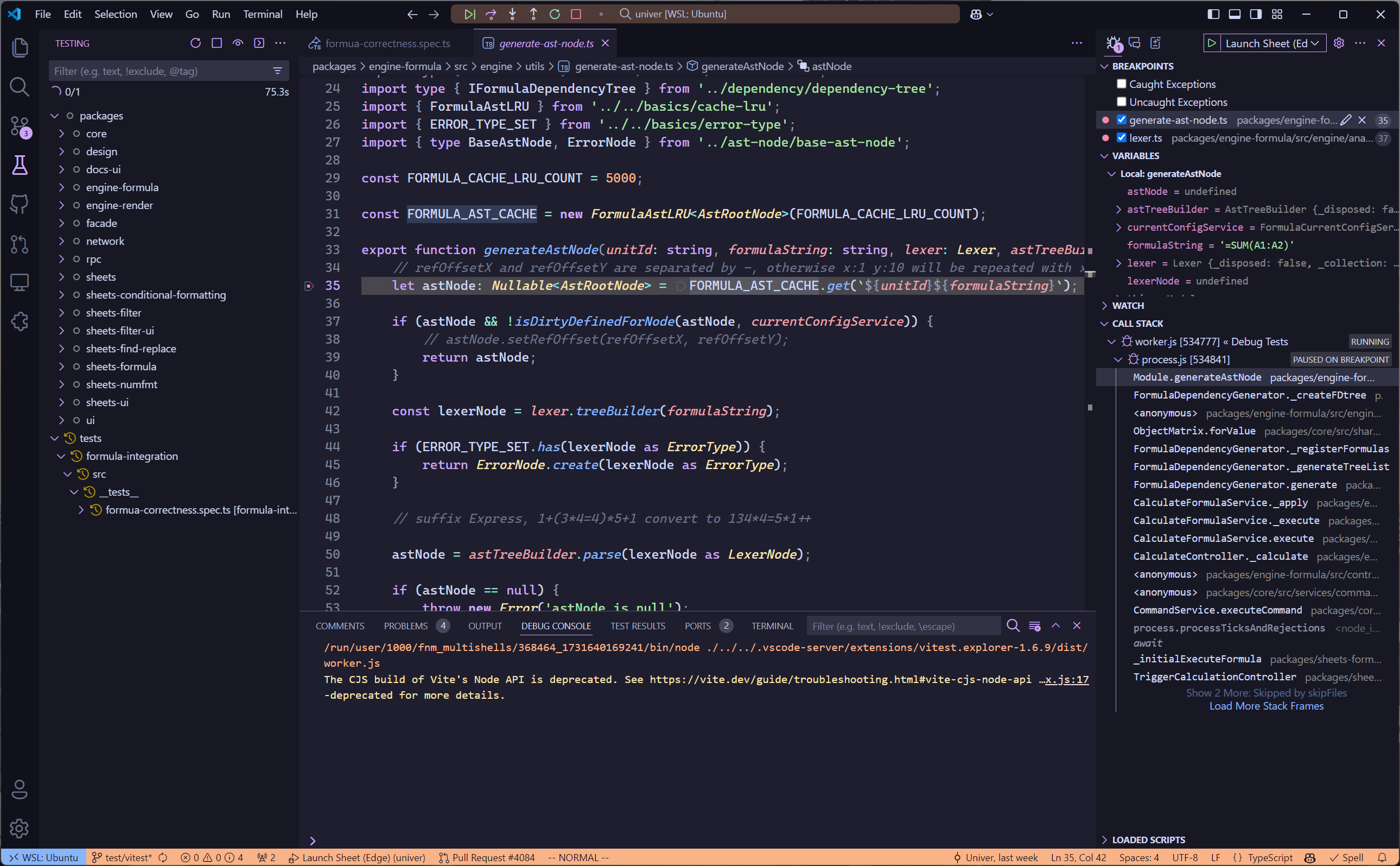
Also, with the help of vscode and its rich ecosystem, you could directly debug unit tests in vscode. Please install the extension we recommend, and you will see the debug button in the side bar. The packages/* glob in vitest.workspace.ts automatically includes new plugins created under packages/.
pnpm dev starts one Vite workbench with lazy-loaded Sheets and Docs routes. Use the navigation bar or #sheets and #docs URLs to switch products; only one Univer instance stays mounted. The Settings menu provides every built-in language, LTR/RTL direction, region, theme, appearance, ribbon, UI chrome, and zoom controls. Preferences are stored in localStorage and applied to the active instance through runtime APIs without remounting it. Development locale data is loaded on demand so unused product and language graphs do not remain in Vite's memory. End-to-end suites should consume built packages outside this repository instead of coupling tests to source examples.
Build the production artifacts to check for differences between the source and compiled output:
pnpm build
pnpm dev:umd
Programs are meant to be ready by humans and only incidentally for computers to execute. - Harold Abelson
References:
Create a new package with our CLI tool:
# pnpm
pnpm create @univerjs/cli init <project-name>

# npm
npm create @univerjs/cli init <project-name>
Please refer to How to Contribute to Facade API.
Follow the deprecation requirements in the API Stability Policy for JSDoc annotations, runtime warnings, and migration guidance. Removing or incompatibly changing a deprecated API still requires a breaking-change notice.
Then run bash setup.sh. It stops at the first error and is safe to run again. Servers and tests aren't started; it lists them at the end. Read it first.
Needs Git: xcode-select --install
git clone https://github.com/dream-num/univer.git
cd univer
Node.js LTS (no version pinned)
# needs nvm: brew install nvm (or https://github.com/nvm-sh/nvm)
nvm install --lts
corepack enable
pnpm install
pnpm dev
pnpm test
In a browser application using a bundler such as Vite:
pnpm add @univerjs/presets @univerjs/preset-sheets-core
Create the container before initializing Univer:
<div id="app" style="height: 100vh"></div>
import { UniverSheetsCorePreset } from '@univerjs/preset-sheets-core'
import UniverPresetSheetsCoreEnUS from '@univerjs/preset-sheets-core/locales/en-US'
import { createUniver, LocaleType, mergeLocales } from '@univerjs/presets'
import '@univerjs/preset-sheets-core/lib/index.css'

const { univerAPI } = createUniver({
  locale: LocaleType.EN_US,
  locales: {
    [LocaleType.EN_US]: mergeLocales(UniverPresetSheetsCoreEnUS),
  },
  presets: [
    UniverSheetsCorePreset({
      container: 'app',
    }),
  ],
})

univerAPI.createWorkbook({})
Your page now contains a spreadsheet editor. Use the returned univerAPI to work with its content. This example uses open-source packages and needs no commercial Univer license or Server SDK.
For component frameworks, retain the univer instance returned by createUniver and call univer.dispose() when the component unmounts. See the lifecycle guide.
Presets compose plugins and register their Facade APIs. For manual control, see the Plugin Mode example below. The installation guide covers both modes, peer dependencies, and framework integrations.
Keep coordinated @univerjs/* packages on the same version. Commercial packages must use the matching release line; independently released packages such as icons follow their declared compatibility. See the API Stability Policy.
<a id="connect-your-application-to-editable-content"></a>
No reports for macOS yet.
GitManual AI Agent reads the 10 key files and writes a step-by-step guide for macOS. Once written, it's saved for everyone.