Reading the repo
Opening the box…
Reading the repo
Opening the box…
How to install on Linux
A Claude Code skill bundle for bug hunting and external red-team work - 82 skills, 15 slash commands, 681 disclosed-report patterns curated across 24 core vulnerability classes, plus enterprise identity + infrastructure attack matrices.
Saved setup from 11 h ago
Will it work on Linux?
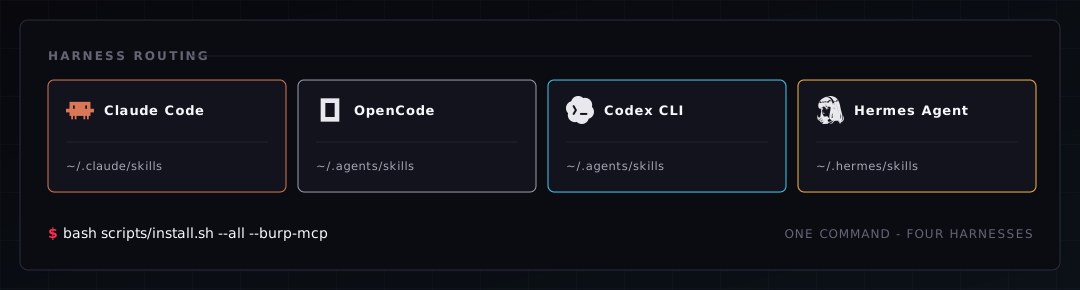
The skills are plain Agent Skills — the same SKILL.md format that Claude Code · OpenCode · OpenAI Codex CLI · Hermes Agent · Google AntiGravity all load. One command installs them everywhere:
# macOS / Linux
bash scripts/install.sh --all --burp-mcp

# Windows (PowerShell)
pwsh ./scripts/install.ps1 -All -BurpMcp
| Harness | Target Skill Directory | Flag |
|---|---|---|
| Claude Code (baseline) | ~/.claude/skills/ | (default) |
| OpenCode | reads ~/.claude/skills/ & ~/.agents/skills/ | (default) / --agents |
| OpenAI Codex CLI | ~/.agents/skills/ | --agents |
| Hermes Agent | ~/.hermes/skills/ | --hermes |
| Google AntiGravity | ~/.gemini/config/skills/ | --antigravity |
--all (-All) detects installed harnesses and copies skills to each harness's path (~/.claude/skills, ~/.agents/skills, ~/.hermes/skills, ~/.gemini/config/skills); --burp-mcp (-BurpMcp) wires the Burp MCP server into each. The full knowledge layer ports to all five — the slash commands and /hunt engine stay Claude-Code-only by design.
The maintainers included scripts/install.sh. Run it from the cloned folder after reading it.
bash scripts/install.sh
Also: scripts/install-community-skills.sh, scripts/install.ps1, scripts/install-community-skills.ps1
INSTALL.mdStep-by-step setup for the Claude-BugHunter skill bundle.
cbh CLI runnercbh --burp routes traffic through Burp's proxy. Without Burp, the CLI runs in curl-only mode and everything still works.subfinder (ProjectDiscovery) — improves passive subdomain enum. Without it, cbh recon falls back to crt.sh alone.| Mode | What you need | Best for |
|---|---|---|
| Curl-only | Just Python 3.9+ | Quick hunts, scripted automation, no GUI |
| Burp proxy (cbh --burp) | Add Burp Suite Pro/Community | All cbh traffic logged in Burp; one click to Repeater |
| Burp MCP (conversational) | Burp Pro + MCP extension + Claude Code MCP setup | Maximum LLM-driven workflow inside Claude Code |
All three modes are first-class supported. The skills + CLI work identically across them — you pick based on what you have installed and how you like to work.
# macOS / Linux
mkdir -p ~/security-research && cd ~/security-research

# Windows (PowerShell)
New-Item -ItemType Directory -Force -Path "$HOME\security-research"
cd "$HOME\security-research"

# both
git clone https://github.com/elementalsouls/Claude-BugHunter.git
cd Claude-BugHunter
# macOS / Linux
bash scripts/install.sh

# Windows (PowerShell)
pwsh ./scripts/install.ps1
The repo ships a
.gitattributesthat forces LF line endings on shell and PowerShell scripts, so a fresh clone installs cleanly on every platform. If you have an existing checkout that already picked up CRLF (cloned before this.gitattributes), normalize it once withgit add --renormalize . && git checkout .(or just re-clone) — a CRLF-corrupted script aborts with asyntax errorand cannot fix itself.
This copies:
~/.claude/skills/ (macOS/Linux) or %USERPROFILE%\.claude\skills\ (Windows)~/.claude/commands/hunt scaffolder → ~/.claude/scripts/hunt.sh (sourced from your .zshrc/.bashrc) on macOS/Linux, or ~\.claude\scripts\hunt.ps1 (dot-sourced from your PowerShell $PROFILE) on WindowsExisting skills with the same name are backed up to ~/.claude/install-backups/<timestamp>/ — outside the skills/commands directories, so backups never load as duplicate skills. Re-runs are non-destructive.
The skills are plain Agent Skills, so they also run outside Claude Code:
# macOS / Linux
./scripts/install.sh --all          # also installs to ~/.agents/skills (Codex/OpenCode), ~/.hermes/skills (Hermes), and ~/.gemini/config/skills (AntiGravity)
./scripts/install.sh --agents       # just Codex + OpenCode
./scripts/install.sh --hermes       # just Hermes
./scripts/install.sh --antigravity  # just Google AntiGravity
./scripts/install.sh --agents --burp-mcp   # also wire your Burp MCP into those harnesses
# Windows (PowerShell)
pwsh ./scripts/install.ps1 -All          # Codex + OpenCode + Hermes + Google AntiGravity
pwsh ./scripts/install.ps1 -Agents       # just Codex + OpenCode
pwsh ./scripts/install.ps1 -Hermes       # just Hermes
pwsh ./scripts/install.ps1 -AntiGravity  # just Google AntiGravity
pwsh ./scripts/install.ps1 -Agents -BurpMcp   # also wire your Burp MCP into those harnesses
Slash commands, the plugin marketplace, and the /hunt engine are Claude-Code-only; other harnesses get the skill knowledge + Burp MCP. Full details and per-harness MCP snippets: docs/multi-harness.md.
Skip this step if you don't have Burp Suite Pro. The bundle works fine in curl-only mode (cbh recon target.com etc.). Set this up later when/if you adopt Burp.
In Burp Suite:
Started MCP server on 127.0.0.1:9876~/.BurpSuite/mcp-proxy/mcp-proxy-all.jar)In your terminal:
# macOS / Linux
claude mcp add burp -s user -- java -jar ~/.BurpSuite/mcp-proxy/mcp-proxy-all.jar
# Windows (PowerShell)
claude mcp add burp -s user -- java -jar "$HOME\.BurpSuite\mcp-proxy\mcp-proxy-all.jar"
Verify in a fresh claude session:
/mcp
You should see burp · ✓ connected.
The bundle ships a frozen snapshot of shuvonsec's skills. To pull the latest from upstream and re-bundle:
# macOS / Linux
chmod +x scripts/install-community-skills.sh
./scripts/install-community-skills.sh

# Windows (PowerShell)
pwsh ./scripts/install-community-skills.ps1
This clones shuvonsec/claude-bug-bounty into ~/security-research/community-skills/ and runs its installer. Useful when you want fresher hunt patterns; not needed for first-time setup.
Windows note: the upstream
shuvonsec/claude-bug-bountyships its own bash installer.install-community-skills.ps1runs it through Git-for-Windowsbashif available, and skips it (with a notice) otherwise. Install Git for Windows (https://git-scm.com).
If you want to regenerate hunt-* per-class skills from fresh disclosed HackerOne reports periodically:
cd ~/security-research
git clone https://github.com/shuvonsec/public-skills-builder.git
cd public-skills-builder

# Need Python 3.10+ — use Homebrew on macOS
brew install python@3.12
/opt/homebrew/bin/python3.12 -m venv .venv
source .venv/bin/activate
pip install -r requirements.txt 2>/dev/null || pip install anthropic httpx pydantic requests

# Configure API keys
cp .env.example .env
# Edit .env:
#   ANTHROPIC_API_KEY=sk-ant-...
#   H1_API_KEY=your_h1_username:your_h1_token
Important: Anthropic API and Claude Max are separate billing systems. Max gives you Claude Code access; the API is pay-per-token. You need both keys (
console.anthropic.com/billingfor the API key) to run the generator.
Run the generator:
python3 public_skills_builder.py --source h1-public --program shopify --limit 200
Other H1 programs with high disclosed-report counts: gitlab, hackerone, mail-ru, valve, uber, twitter. The generator outputs flat .md files in skills/ — you'll need to wrap each in its own folder structure (hunt-name/SKILL.md) before installing to ~/.claude/skills/.
| Issue | Fix |
|---|---|
| unsupported operand type: str \| None | Python <3.10 — install 3.12 via Homebrew |
| Filter parameters must contain at least one program handle | Add --program <handle> |
| Could not fetch ngalongc/bug-bounty-reference | Hardcoded master branch URLs — patch script to try main first |
Open a fresh claude session in any folder:
claude
Try a hunt-class trigger test:
I have a reflected user input that's rendered into the page HTML — testing for XSS. What payloads should I try?
Expected: Claude triggers hunt-xss and walks you through detection patterns + payloads.
Try the validation flow:
/triage
Then describe a hypothetical finding. Expected: Claude runs the 7-Question Gate.
Try the engagement scaffold:
hunt acme-test
ls ~/Targets/acme-test/
Expected: a complete folder with CLAUDE.md, scope.md, findings/, evidence/, submissions.txt, notes.md, .gitignore.
If all three smoke tests pass, you're set up.
Delete the test target:
# macOS / Linux
rm -rf ~/Targets/acme-test

# Windows (PowerShell)
Remove-Item -Recurse -Force "$HOME\Targets\acme-test"
Then go find a real program and put it to work. See USAGE.md for the full workflow walkthrough.
| Symptom | Likely cause | Fix |
|---|---|---|
| /mcp doesn't show burp | Burp Suite not running, or extension not loaded | Re-open Burp, confirm Extensions tab shows MCP Server with "Loaded" checked |
| hunt: command not found (macOS/Linux) | Shell didn't pick up the source line | Restart your terminal, or source ~/.zshrc |
| hunt not recognized (Windows) | PowerShell didn't load the profile | Open a new PowerShell window, or . $PROFILE; check execution policy is RemoteSigned or less restrictive (Get-ExecutionPolicy -List) |
| Skills don't trigger as expected | Description-field keyword mismatch | Mention the bug class explicitly in your prompt (e.g., "I'm testing IDOR on this endpoint") |
| burp - get_proxy_history_regex returns empty | Burp's proxy history is empty for that target | Browse the target through Burp first to populate history |
| Python build errors during step 5 | Using system Python 3.9 | macOS: use Homebrew Python 3.12 (/opt/homebrew/bin/python3.12 -m venv .venv); Windows: use the official python.org installer or py -3.12 -m venv .venv |
The installer writes a manifest of exactly what it placed (under
~/.claude/.skill-manifests/claude-bughunter.txt). Remove that footprint — and
only that footprint — with:
# macOS / Linux
bash scripts/install.sh --uninstall

# Windows (PowerShell)
pwsh ./scripts/install.ps1 -Uninstall
This removes the bundle's skills, slash commands, the hunt.sh/hunt.ps1 script, and its
shell-rc source line. Skills you also installed from the sister bundle
Claude-OSINT — offensive-osint
and osint-methodology — are kept if Claude-OSINT's manifest still claims them,
so uninstalling one bundle never breaks the other. (Install backups under
~/.claude/install-backups/ are left in place; delete them manually if you want.)
If you installed via the plugin instead of the script: /plugin uninstall claude-bughunter@elementalsouls.
Burp MCP, if you wired it, is removed separately: claude mcp remove burp.
Then run bash setup.sh. It stops at the first error and is safe to run again. Servers and tests aren't started; it lists them at the end. Read it first.
Compare yours with the README's “Runs on multiple agent harnesses” list above before installing anything.
git clone https://github.com/elementalsouls/Claude-BugHunter.git
cd Claude-BugHunter
Python >=3.9
sudo apt install python3 python3.9 python3-venv # Debian/Ubuntu
python -m venv .venv
source .venv/bin/activate
pip install -e .
Option A — install as a Claude Code plugin (recommended). From inside Claude Code:
/plugin marketplace add elementalsouls/Claude-BugHunter
/plugin install claude-bughunter@elementalsouls
All 83 skills + 15 commands load namespaced under claude-bughunter: and update when you bump the plugin version — no files copied into ~/.claude/.
Option B — copy install (no plugin system / pin to a clone):
git clone https://github.com/elementalsouls/Claude-BugHunter.git
cd Claude-BugHunter
# macOS / Linux
bash scripts/install.sh

# Windows (PowerShell)
pwsh ./scripts/install.ps1
Both copy the skills + commands into ~/.claude/ (macOS/Linux) or %USERPROFILE%\.claude\ (Windows) and wire the hunt engagement scaffolder.
What each install path gives you:
| Path | 83 skills + 15 slash commands | cbh CLI | hunt scaffolder |
|---|---|---|---|
| A — plugin | ✅ namespaced under claude-bughunter: | ➕ separate pipx install | ❌ clone-only |
| B — copy install | ✅ copied into ~/.claude/ | ✅ from the clone | ✅ from the clone |
The plugin is the fastest path to the skills + slash commands. The terminal-native
cbh runner installs standalone — pipx install git+https://github.com/elementalsouls/Claude-BugHunter
— so plugin users can add it without a full clone (see cbh CLI).
The hunt engagement scaffolder ships with the clone (Option B).
That's it. Open Claude Code and describe what you're testing in plain English — the right skill loads automatically, no invocation by name:
> Testing acme.com — an in-scope HackerOne target. Run recon and rank the surface.

  ⟳ loading skills: web2-recon, offensive-osint, bb-methodology …
    → subdomain enum (subfinder + crt.sh) … 47 hosts
    → live hosts (httpx) … 12 · tech fingerprint … 6 distinct stacks
    → ranked surface: api.acme.com (GraphQL, introspection ON)  ← start here
                      auth.acme.com (OAuth, SSO)               ← hunt-oauth

  Next: want me to probe the GraphQL introspection + OAuth redirect_uri?
→ Full Installation guide · Usage guide · searchable skill catalog.
The block above is an illustrative transcript. To record a real demo of your own session:
asciinema rec demo.cast→ upload to asciinema.org and drop the badge here.
No reports for Linux yet.
GitManual AI Agent reads the 9 key files and writes a step-by-step guide for Linux. Once written, it's saved for everyone.