Reading the repo
Opening the box…
Reading the repo
Opening the box…
How to install on Linux
Fapeed - Adult Slideshow App
Saved setup from 9 h ago
Will it work on Linux?
The maintainers included install_ubuntu.sh. Run it from the cloned folder after reading it.
bash install_ubuntu.sh
Also: install_windows.bat
Then run bash setup.sh. It stops at the first error and is safe to run again. Servers and tests aren't started; it lists them at the end. Read it first.
git clone https://github.com/pronopython/fapeed.git
cd fapeed
Python 3.x (no version pinned)
sudo apt install python3 python3-venv # Debian/Ubuntu
python -m venv .venv
source .venv/bin/activate
pip install -e .
When you start Fapeed from start menu or commandline without any parameters, a dialog pops up:
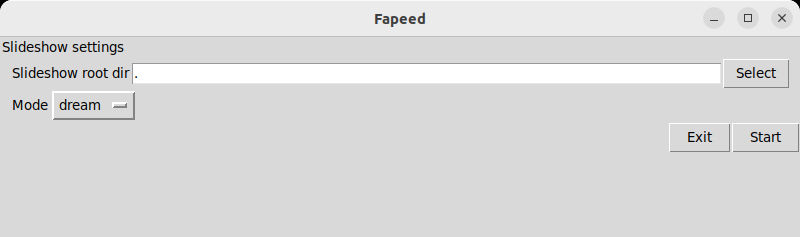
Select the root dir (where you store your images) to crawl and the mode the images should be presented.
You can start Fapeed directly via command line and provide a directory to crawl and optionally a mode number:
fapeed [images root dir] [optional: mode (as number)]
|Key/Button| Action| |--|--| |left mouse button|pause/resume| |+| increase images per second| |-| decrease images per second| |i| toggle info (FPS)| |left arrow| rewind back one image| |right arrow| one image forward to current position| |n| while in rewind: open current image|
Rewind will trigger pause mode. Leave rewind by pressing left mouse button.
Images per second are presented as "fps" = fapels per second. A fapel is a fap-able element... ;-)
Seen an image you like and want to know where it can be found?
You can press left arrow key to pause Fapeed slideshow and activate the "rewind" feature. You can of course also first pause Fapeed with the left mouse button and then start rewinding.
While in rewind, you can go through the last 100 shown images with left and right arrow key and open the currently selected image with n key in your system's default image viewer.
Leave rewind by unpausing Fapeed with left mouse button.
No reports for Linux yet.
GitManual AI Agent reads the 2 key files and writes a step-by-step guide for Linux. Once written, it's saved for everyone.